Repairing a Roborock S5 Max Robot Vacuum
25 Jan 2026so, a few weeks ago my sister bought a used Roborock S5 Max robot vacuum cleaner. it worked perfectly - for a few days. then it started to have problems with navigation, simply turning in circles in open spaces.
 |
|---|
| Robot Activities (symbolic) |
after some failed troubleshooting attempts (updating firmware, cleaning sensors, etc) she decided to ask me for help.
Basic Troubleshooting
Back to the original Firmware
of curse, my first step was to reset the robot to factory settings and firmware version. after all, this is a chinese product, so who knows what kind of firmware update they may have pushed (after the warranty period, of course).
to do this:
- press the home button for 5 seconds
- the “reset” button (located under the top cover), while keeping the home button pressed
- release the “reset” button, keeping the home button pressed for another 5 seconds
(see this guide)
sadly, this did not help
Checking general motion and LIDAR mapping ability
the robot offers a joystick mode for manual movement. in this mode, the robot will also use the LIDAR to map the environment.
i’ve driven the robot around the room using the joystick mode, and observed the LIDAR map being built in real-time in the app. everything worked perfectly, and the map looked good.
sadly, as soon as i commanded the robot to move autonomously, it started to spin in circles again.
to me, this suggested like either a software issue - which is unlikely, given the firmware reset - or a hardware issue related to the movement sensor or feedback.
Entering the BIT Mode
Roborock vacuums have a hidden BIT (Built-In Test) mode, which (on this model) can be accessed as follows:
- power off the robot
- press and hold the power button
- while holding the power button, press the home button 5 times
- release the power button
from here, you can cycle through various tests using the home and power buttons. these tests range from simple switch tests - indicating whether e.g. the bumper inputs are pressed using the leds, to more complex tests like motor movement and LIDAR operation.
more details on the BIT mode can be found at various places online. here’s some i found useful:
- https://www.youtube.com/watch?v=c6mxG5HYA70
- https://www.youtube.com/watch?v=Fcea7dd7DFI
- https://www.youtube.com/watch?v=Iq74XT-jIDw
- https://cleanerstalk.com/roborock-error-codes/#t-1649313234742 (not in my case, but good to know)
Results
after running all tests and - suprisingly - all passed. well, that’s unexpected.
weirdly enough, running the tests on a different day, i’ve finally got a failed test: the robot reports an error with the left wheel movement test.
this would make sense, an encoder on the motor failing would cause the robot to see weird feedback when moving autonomously, certainly enough to throw off its navigation algorithms. with the test only failing intermittently, i’d also suspect something simpler - a loose connector, dirty contacts, or corrosion on the encoder itself.
Disassembly and Repair
disassembling the Roborock S5 Max is relatively straightforward, although a bit tedious. i’ve used this video teardown as reference, though i didn’t follow every step exactly: https://www.youtube.com/watch?v=0vLa4-iikzM
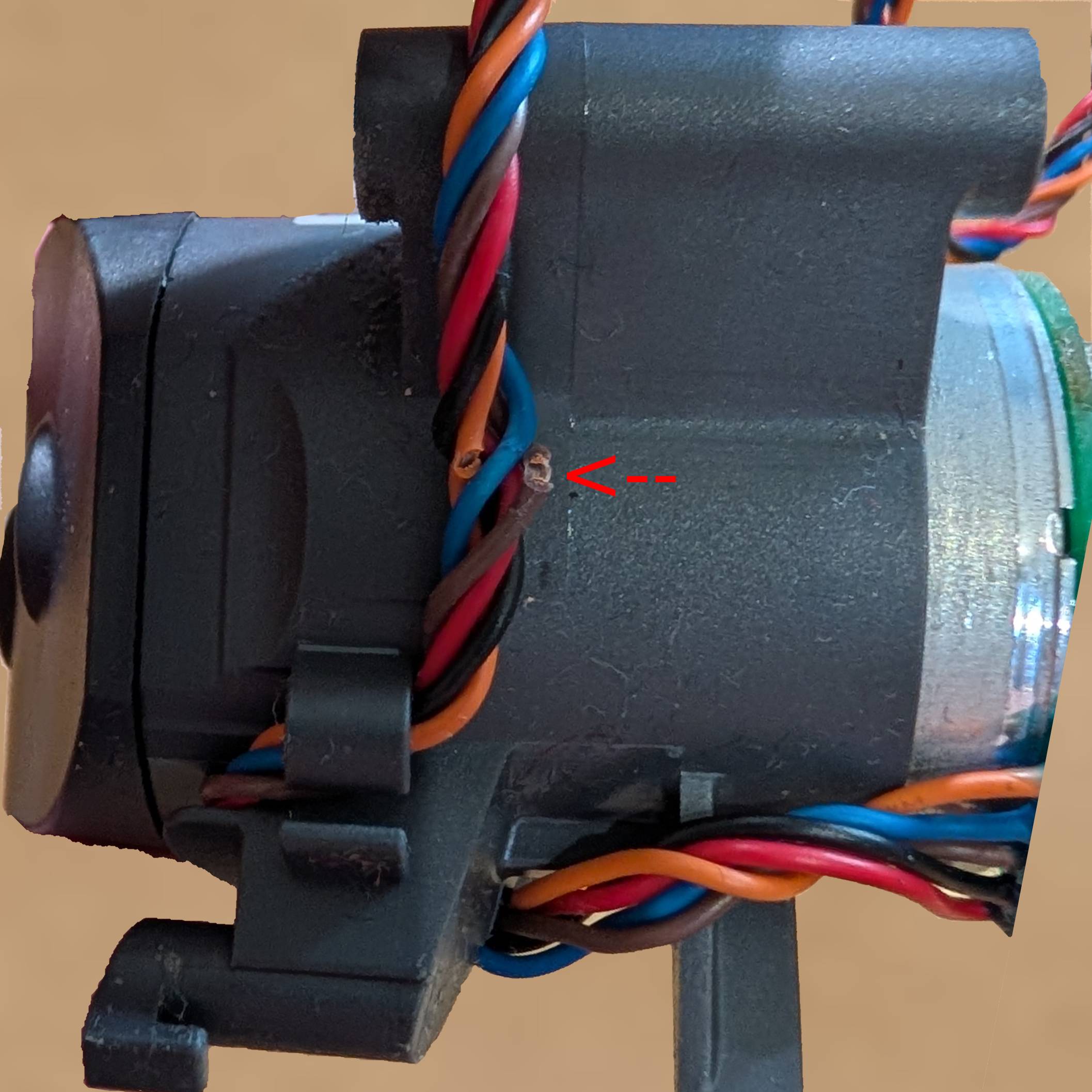
after removing the left wheel assembly, i could inspect the motor and encoder. and sure enough, there was something wrong with it, though not what i expected.
 |
|---|
| Left Wheel Motor Assembly |
as you can see, two of the wires going to the motor assembly were broken. one wire was completely severed, while the other was only partially broken.
taking a closer look and, sure enough, the wires were wired to the motor encoder. so the robot could move, but had no feedback from the left wheel encoder, causing the freak out during autonomous navigation.
The Repair
since the wires are at a point where they flex a lot, i’ve decided to replace the wires from the motor assembly PCB to the mainboard connector. that way, no stress would be applied to the solder joints splicing the wires together.
sadly, i didn’t take pictures of the repair, but imagine two wires soldered together. i’m sure you can picture it.
since i had the robot disassembled, i also took the opportunity to clean all the dust and dirt from the internals. i also added some fresh grease to the motor gearboxes, since they looked a bit dry.
that’s it, after reassembling the robot, it works perfectly again.
Notes
since originally writing this post, the robot has been working perfectly. i also ended up getting my hands on a Roborock S7 with the exact same issue, and the same repair process applied as well. so it seems like this is a common issue with roborock vacuums using this kind of motor assembly / chassis.
since the fault results in a very specific symptoms, it should be easy to remote-diagnose this issue by checking:
- does the robot exit the charging dock correctly? -> want yes
- the initial movement out of the dock is done without using the wheel encoders, so if this works then the motors and drivers are fine.
- does mapping work? -> want yes
- if this works then the LIDAR and mainboard are fine.
- does the robot stop when bumpers are actuated? -> want yes
- if this works then the bumper sensors are fine.
- does the robot fail to navigate autonomously (going in circles)? -> want no
- the main symptom described in this post. if only this happens, then the issue is likely with the wheel encoder feedback.
- does the robot have (about) 800-1000 hours of use? -> want yes
- this is the lifespan i’ve observed (sample-size of only 2!).
if you have (or for the more adventurous, want to buy) a roborock vacuum with these symptoms, you can be fairly confident that the issue is a fairly simple repair.
as a side note, a complete stop in movement in one of the wheels could also be caused by broken wires, in that case the robot would fail to exit the dock as well. however, that symptom could also be caused by a failed motor driver, so it would be less conclusive than the symptoms described above.