Voxelab Aquila V1.0.1 (and V1.0.2) Trimatic Stepper Control Mod
10 Feb 2025This post describes how to modify the Aquila V1.0.2 HC32 mainboard in order to add TMC Stepper UART control lines. Doing this allows changing stepper driver parameters (e.g. stepping mode, current) from Marlin firmware.
NOTICE:
This post was written for the Aquila V1.0.2 mainboard.
However, since the Aquila V1.0.1 mainboard is fairly similar, it should still work.
Preword
Having the option to control the parameters of the stepper drivers is quite useful. For one, you’ll be able to enable the otherwise unavailable 1/256 microstepping mode that the TMC2208 and clones provide. Additionally, you can adjust the motor current more precisely than by using the “classic” analog pot.
However, the biggest advantage is to change the stepping mode, for example to disable StealthChop (quiet) mode. By doing this, advanced motion features like Linear Advance and Input Shaping are said to work better.
Hardware
On my mainboard, the following ICs were used:
- HDSC HC32F460 MCU
- this is the main processor. If you have a different one, the information in this document could still be useful but the pins will not match.
- KalixChips MS35775 Stepper Drivers
- These four ICs drive the stepper motors. These ICs are close to exact clones of the TMC2208 (see the datasheet (mirror) to see yourself), including the UART control mode. Main difference is the horrible lack of documentation.
- If you have different stepper drivers, and they don’t happen to be original TMC2208, do not continue with this mod until you’ve confirmed they support the UART control mode.
- If your board has TMC2209 stepper drivers, consider combining this document with another one specifically for those drivers. They support connecting to a single UART line, so require less pins and less cabling. However, this exact mod should still mostly apply.
VERY IMPORTANT:
double-check that your mainboard matches the hardware described here
Modification
This modification will set the mainboard up in such a way that each stepper driver is connected to one pin of the MCU, allowing half-duplex software-serial to be used. To ensure that a error while soldering or a broken stepper driver will not immediately damage the MCU, a 1k series resistor is added to each line.
NOTICE:
this mod leaves the PDN_UART 10k pull-up resistor in place.
this way, the modified mainboard will behave as before, unless the software takes control to drive the pins.
Requirements
- sharp hobby knife
- soldering iron with fine tip
- thin, isolated wire
- 4x 1k SMD resistor
- current Marlin firmware (with HC32 arduino core version 1.3.1 or newer)
Choosing the Pins
On this mainboard, there aren’t many pins left free for use. The free pins are (assuming you’ve installed a BLTouch probe):
| Useable | Pin | Function / Connection | Note |
|---|---|---|---|
| ⚠️ | PA8 | CH340G DTR | connected to CH340G DTR; otherwise useable |
| ✅ | PB2 | Screen header #2 | free for DWIN screen |
| ✅ | PB10 | R90 | |
| ❌ | PB11 | MD | multiplexed with MODE selection logic; input-only pin |
| ✅ | PC6 | Screen header #1 | free for DWIN screen |
| ✅ | PC14 | XTAL32 | can use GPIO |
| ❌ | PC15 | XTAL32 | datasheet says this pin works as GPIO, but in my testing input function didn’t work |
| ✅ | PH2 | R101 |
I used pins PA8, PB10, PC14 and PH2 for my connections. This is what the rest of this document will describe too
Cutting trace PA8 -> CH340G DTR
As you can see in the table, PA8 is connected to the CH340G’s DTR pin. Luckily, DTR is not used for anything in this printer, so we can just cut the trace.
 |
|---|
| Cut trace PA8 to CH340G with a hobby knife |
After cutting the trace, ensure there’s no copper sticking up that could short out to the case and measure with a multimeter that the trace is actually cut completely. To protect the area, place a bit of kapton tape over it.
Soldering the Wires

Solder the wires as shown in the following image.
 |
|---|
| Modification Wiring Plan |
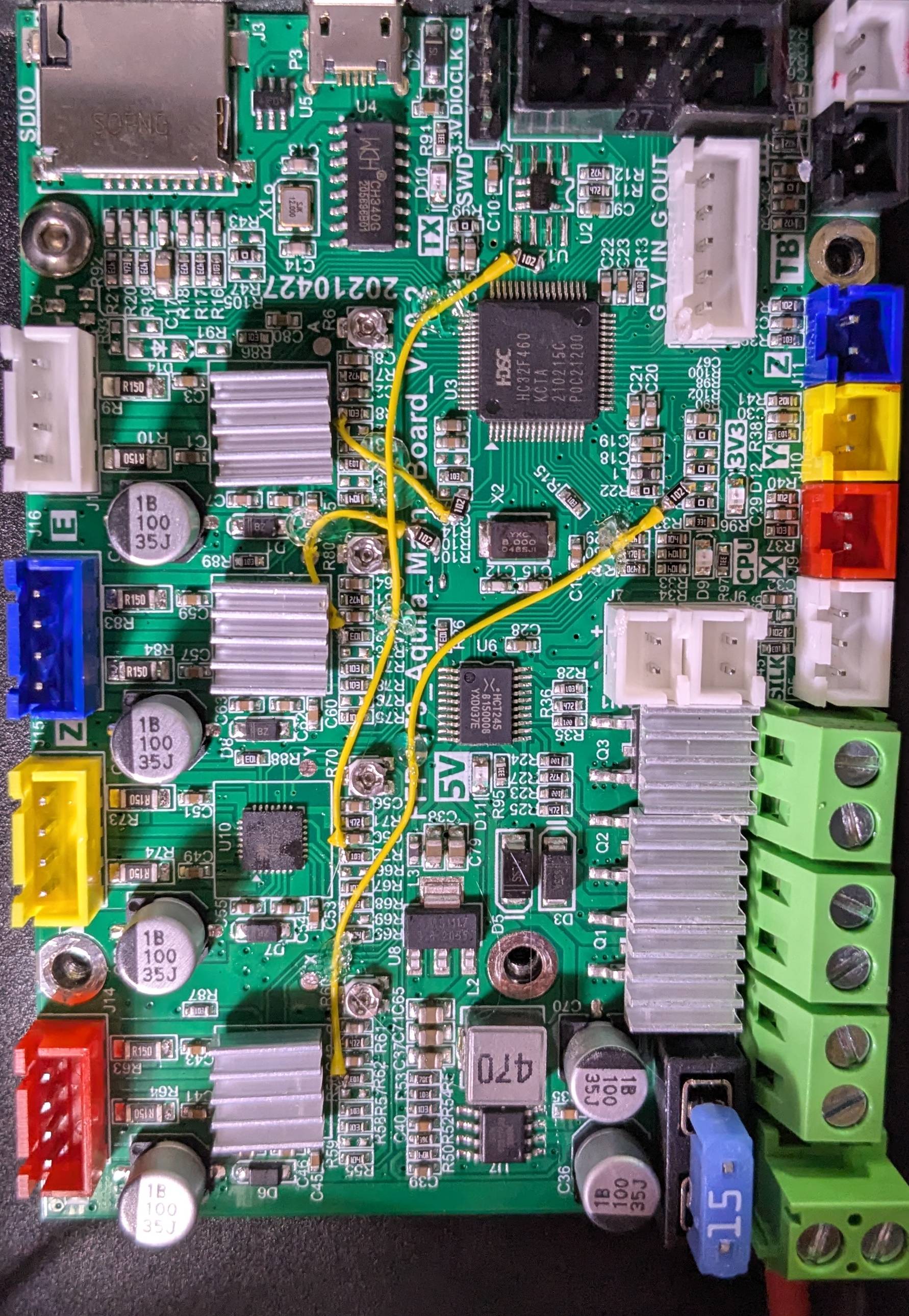
to ensure the wires don’t come loose, secure them with a bit of hot glue. for the PA8 connection, scrape away the solder mask on one of the wires near the HC32 before soldering.
 |
|---|
| Finished Modification |
Configuring Marlin
Change the Marlin configuration to the following:
- In
Configuration.h, in@section stepper drivers:- Change the stepper driver types from
TMC2208_STANDALONEtoTMC2208for X,Y,Z,E0
- Change the stepper driver types from
- in Configuration_adv.h, in the
@section tmc/configsection:- add the pin definitions (RX is automatically set to TX if not defined):
#define X_SERIAL_TX_PIN PB10#define Y_SERIAL_TX_PIN PA8#define Z_SERIAL_TX_PIN PC14#define E0_SERIAL_TX_PIN PH2
- add
#define TMC_BAUD_RATE 19200to use 19200 baud for serial communication - update the
RSENSEof all axis to#define [X]_RSENSE 0.15(this board uses 150 mOhm current sense resistors) - update the
CHOPPER_TIMINGto#define CHOPPER_TIMING CHOPPER_DEFAULT_24V - optionally enable
MONITOR_DRIVER_STATUS - enable
TMC_DEBUGuntil you’ve confirmed that everything works
- add the pin definitions (RX is automatically set to TX if not defined):
Now, flash the firmware onto your modified mainboard. For initial testing, only the power cables have to be connected.
Confirm everything works
to confirm the mod was sucessfull, send a M122 command to show the status of the stepper drivers.
there should be no errors, and the output should look something like this:
		X	Y	Z	E
Enabled		false	false	false	false
Set current	800	800	800	800
RMS current	760	760	760	760
MAX current	1072	1072	1072	1072
Run current	17/31	17/31	17/31	17/31
Hold current	8/31	8/31	8/31	8/31
CS actual	8/31	8/31	8/31	8/31
PWM scale
vsense		0=.325	0=.325	0=.325	0=.325
stealthChop	true	true	true	false
msteps		16	16	16	16
interp		true	true	true	true
tstep		max	max	max	max
PWM thresh.
[mm/s]
OT prewarn	false	false	false	false
OTPW trig.		false	false	false	false
pwm scale sum	10	10	10	10
pwm scale auto	0	0	0	0
pwm offset auto	36	36	36	36
pwm grad auto	14	14	14	14
off time	4	4	4	4
blank time	24	24	24	24
hysteresis
 -end		2	2	2	2
 -start		1	1	1	1
Stallguard thrs
uStep count	72	72	856	40
DRVSTATUS	X	Y	Z	E
sg_result
stst
olb					*
ola					*
s2gb
s2ga
otpw
ot
157C
150C
143C
120C
s2vsa
s2vsb
Driver registers:
		X	0xC0:08:00:00
		Y	0xC0:08:00:00
		Z	0xC0:08:00:00
		E	0x80:08:00:C0


Testing X connection... OK
Testing Y connection... OK
Testing Z connection... OK
Testing E connection... OK
if any of the last four tests fail, or if any of the driver registers show all zeros, double-check your wiring. additionally, you may want to double-check that the used pins are actually not connected to anything else (different mainboard revisions may differ here).
if everything seems right, try different values for TMC_BAUD_RATE.
Lower values may help with signal integrity issues, while higher values can help with the stepper drivers having issues detecting that there’s a UART signal present.
19200 baud should be a good starting point.